Dispatch & Operations Calendar
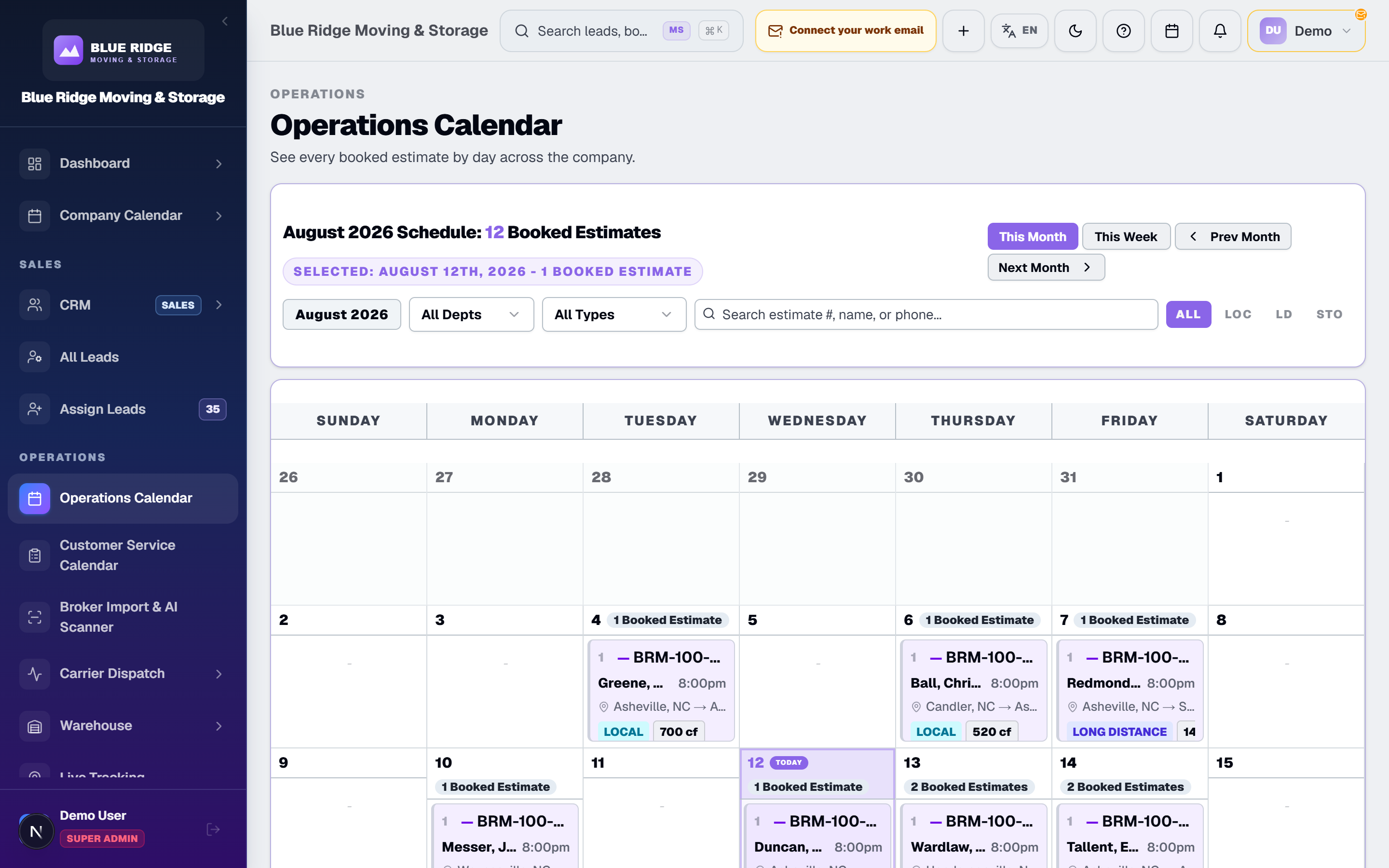
A booked estimate IS the job. It lands on the calendar the moment sales books it — crews, trucks, and payments hang off the same record.
How Dispatch Works Here
No export, no import, no re-keying. Dispatch runs on the same estimate record sales already built.
1. Booked means scheduled
When a customer signs and the estimate books, it appears on the operations calendar. Dispatch never waits for sales to "send the job over" — the booked estimate is the job, with the addresses, dates, line items, and balance already on it.
2. Plan the month, run the day
The month view shows you where the volume is stacking up so you can spread heavy days before they happen. Drill into a day to work the individual moves. Every dispatcher looks at the same live calendar — not a photo of the whiteboard.
3. Assign crews and trucks on the record
Put workers and trucks on the move right from dispatch. Assignments stick to the estimate record, so when the move completes, payroll already knows who ran it as foreman. No Sunday-night spreadsheet reconstruction.
4. See the trucks, not just the schedule
With the Samsara GPS add-on on Enterprise, live truck positions show on the Live Tracking page in the same platform as your calendar. When a customer calls asking where the crew is, the dispatcher answers without logging into a separate telematics portal.

Why It Beats the Fragmented Setup
Whiteboards, group texts, and a scheduling app that has never heard of your CRM — that setup loses moves.
The Fragmented Setup
- ✕A whiteboard calendar the office photographs at 6 PM
- ✕Sales books a job, then someone re-types it into a scheduling tool
- ✕Crew assignments texted out and forgotten by morning
- ✕Dispatch, GPS, and billing in three different browser tabs
movingstorageapp.com
- ✓A month-view operations calendar every dispatcher sees live
- ✓Booked estimates appear on the calendar the moment they book
- ✓Crew and truck assignments saved on the move record itself
- ✓Dispatch, payments and (on Enterprise) live GPS in one login
Dispatch Questions, Answered
What shows up on the operations calendar?
Booked estimates. When sales books a move, it appears on the calendar automatically — there is no separate job entry step. The calendar entry, crew assignment, Bill of Lading, and final payment all hang off that same booked estimate record.
How do I assign crews and trucks?
You assign workers and trucks directly on the booked estimate from the dispatch view. Because assignment lives on the move record, payroll knows which foreman ran each job and pays the commission from it — no re-entry.
Is there a month view?
Yes. Dispatchers get a month-view operations calendar to balance load across days and spot heavy dates before they become a problem, plus the day-level detail to work each move.
Does dispatch connect to GPS tracking?
Yes, with the GPS add-on. Live GPS Tracking (Samsara) is a paid add-on on Enterprise (price on request). It is not available on Carrier or Professional. Samsara truck positions show on the Live Tracking page in the same platform, so a dispatcher can see where trucks are without opening a separate telematics portal.
Run Dispatch From One Calendar
See a booked estimate hit the calendar, get a crew, and go out the door — all in a live demo. Plans from $299 a month with 15 users.