Warehouse & Storage Management
Run your whole warehouse with QR labels and the phones your crew already carries. Every vault, rack and floor spot on one spot map, assigned from the move, with storage billed from the booked estimate. No hardware scanners, no whiteboard vault maps.
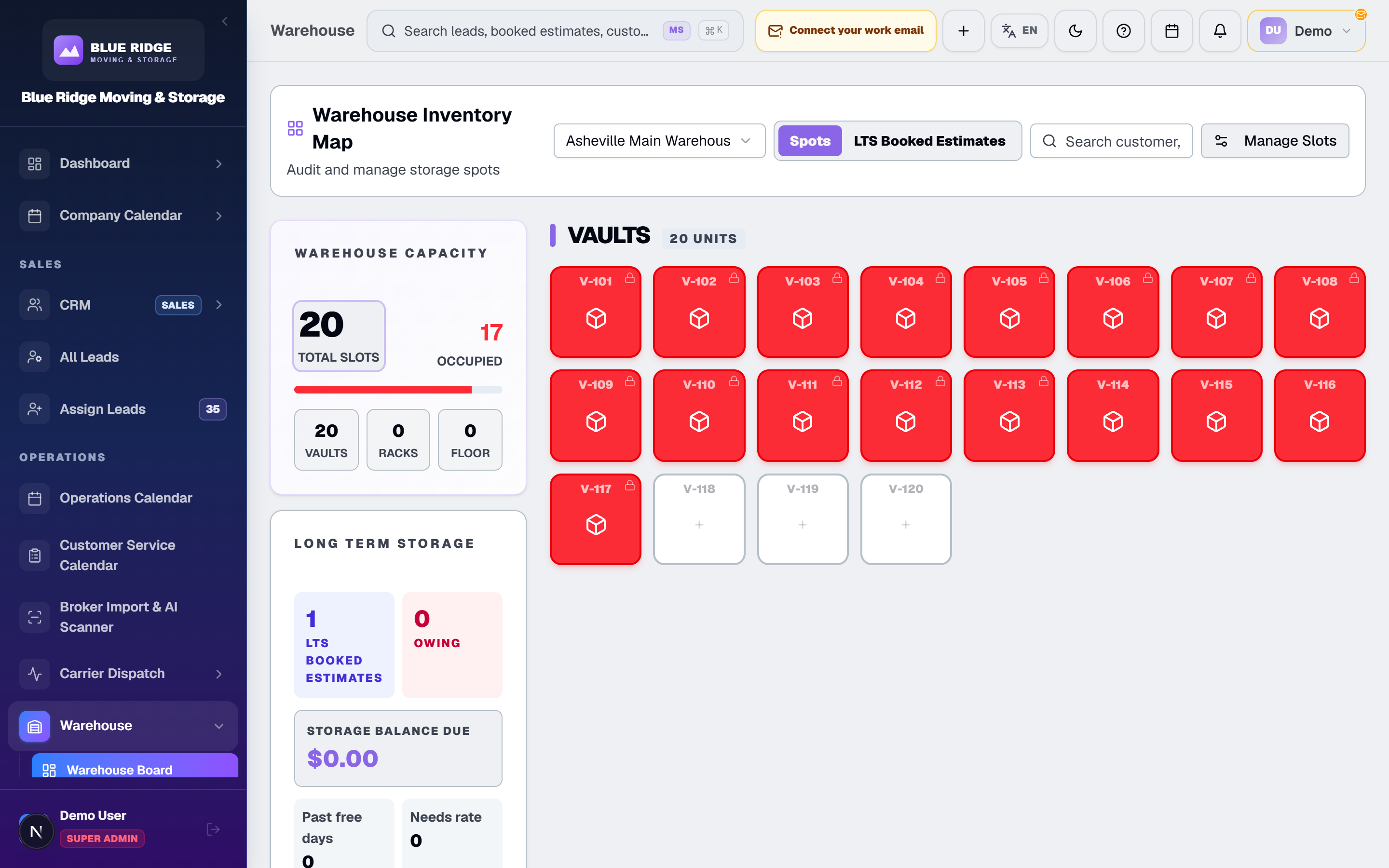
How the WMS Works on Your Floor
Built by movers with 15+ years in the industry. Missing vaults and argued storage billing dates are the two classic warehouse headaches. This is how the platform handles both.
1. Set up your spots once
Generate your warehouse's spots in Settings: vaults, racks and floor spots, each labeled by zone, row, spot number and height (AA17-4 is zone A, row A, spot 17, height 4).
2. Label with QR codes, scan with any phone
Print standard QR labels for vaults and items, and for the household goods on a residential move. Your crew scans them with a phone or tablet camera: check-in, check-out, relocation, verification. Compare that to buying a fleet of dedicated barcode scanners that stop your warehouse cold when one hits the concrete.
3. Know where every vault sits
Each job in storage is assigned its spots from the booked estimate, and the Spot Map shows every occupied spot and the job in it. When a customer calls about a delivery-out, the office searches by job number, customer, lot sticker, spot or city and answers from a screen — nobody walks rows reading tags with a flashlight.
4. Bill storage without chasing it
Storage is billed in 30-day cycles from the free days and rate on the booked estimate, and each cycle lands on the customer's statement. Payments run through the same processing (Stripe or Authorize.Net) you use for moves. Storage revenue is the easiest money in this business to lose track of — this keeps the meter running without a spreadsheet.
5. Warehouse and moves share one record
A move that ends in storage does not get re-entered into a second system. The booked estimate that ran the move carries into the warehouse side, so the customer, the goods, and the money stay connected from lead to final payment.
6. Pull lists and a release gate
Every stored job and every closing sheet carries a printable pull list: the lot, pads and storage spots. On a job that still owes storage, releasing it takes an administrator or someone with the storage release privilege, so goods do not leave while storage charges are unpaid.
7. Onboard warehouse crew in minutes
Everyone already knows how to point a phone camera at a code. There is no scanner training, no device pairing ritual, and no "the gun is charging" excuse. New warehouse hands are scanning on day one.


Why It Beats the Fragmented Setup
Legacy WMS platforms want you buying their hardware. Spreadsheets want you losing vaults. Neither talks to your CRM.
The Fragmented Setup
- ✕Expensive proprietary barcode scanners that halt work when dropped
- ✕Vault locations tracked on a whiteboard or a laminated map
- ✕Goods released while the customer still owes storage
- ✕Storage billing dates managed in a spreadsheet someone forgets
- ✕A standalone WMS that has never met your CRM
movingstorageapp.com
- ✓QR labels scanned with any phone camera — zero scanner hardware
- ✓Digital vault and location tracking you can search from the office
- ✓Releasing storage on a job that owes it needs an approver
- ✓Storage billed in 30-day cycles from the booked estimate
- ✓Warehouse, CRM, and dispatch under one login and one monthly bill
Warehouse Questions, Answered
Do I need to buy barcode scanners?
No. Vaults, storage items and household goods are labeled with plain QR codes that any phone or tablet camera scans, in the warehouse and on residential moves. No proprietary barcode scanners. Your crew already carries the hardware. When a phone breaks, you grab another phone; you do not wait on a proprietary scanner replacement.
Which plans include the warehouse?
The Warehouse WMS is included on Professional and Enterprise (from $599 a month with 30 users) and is a $50-a-month add-on on Carrier.
How does vault and location tracking work?
Your warehouse is set up as spots (vaults, racks and floor spots), and each job in storage is assigned its spots from the booked estimate. Scan the QR label on a vault with a phone camera to check it in, move it or see what is inside. The Spot Map shows every occupied spot and the job in it, and the Storage report searches by job number, customer, lot sticker, spot or city. When a customer calls about their goods, the office looks it up instead of walking the floor.
How is storage billed?
In 30-day cycles from the booked estimate, using the free days and rate set on the estimate. Each cycle is added to the customer’s storage statement, which they open by secure link. Your team records the payment or emails a payment authorization link capped at the storage balance, through your Stripe or Authorize.Net processing. No card is charged automatically.
Is the WMS connected to my moves?
Yes. Storage lives in the same platform as your CRM and dispatch, so a move that ends in storage flows into the warehouse without re-entering the customer. The whole operation runs on one estimate record from lead to final payment.
Scan a Vault With a Phone, Not a Scanner Gun
See QR check-in, spot assignment, vault tracking, and storage billing live. The Warehouse WMS is included on Professional and Enterprise (from $599 a month with 30 users) and is a $50-a-month add-on on Carrier.